

NPMD Solutions

Slide NetSense DPI Sensor Network packet-based application performance for hybrid IT environments Get real time visibility into application & network performance along with cyber threat intelligence with zero overhead on your network or application services Slide vNetSense + vNetMirror Passive application performance observability in cloud Get passive and real time observability into application services performance along with cyber threat intelligence with zero overhead on your cloud resources or application services Slide NetSense High Speed Packet Capture and Analytics For on premises networks get high speed packet capture and analysis - 1G, 10G, 40G, 100G networks

ThoughtData NPMD Solutions

Passive network and application performance monitoring solutions for hybrid IT networks using DPI technology

istockphoto-931816548-612x612

NetSense DPI Sensor

DPI based sensor software only solution for on premises networks
istockphoto-931816548-612x612

vNetSense DPI Sensor

Virtual DPI sensor software solution for private or public cloud networks
istockphoto-931816548-612x612

NetSense DPI Appliance

DPI sensor software on ready to use server appliance for on premises networks
istockphoto-931816548-612x612

vNetMirror

DPI sensor software for application monitoring on virtual machines in public cloud

NetSense DPI Sensor

Highly scalable passive DPI based sensor

Key Highlights

DPI Passive Monitoring

Rich KPI collection for network, application performance along with network based threat intelligence. Deploy on critical links in your data center for continuous monitoring with zero overhead to your network or application or server infrastructure

High Scalability

Scale your DPI network and application performance monitoring for 1G, 10G, 40G,100G networks with ready to deploy appliance solutions
Discover now

Packet Recording

Session level raw packet capture and fast retrieval using indexing. Session level packet trace provides true evidence for various troubleshooting use cases.
Discover now

COTS Ready

Optional: Choose your own commercial off the shelf server appliance for NetSense DPI sensor
Discover now

vNetMirror

Virtual passive packet capture tapping software for virtual machines in your private or public cloud. Scale your DPI sensor deployment for network and application performance in cloud
Discover now

Ready to deploy appliances

Ready to deploy NetSense DPI sensor appliances in your on-premises networks.
Discover now

vNetMirror

Passive network and application performance monitoring in public cloud

Key Highlights

Passive monitoring in any public cloud

Achieve passive network and application monitoring in any public cloud with vNetMirror packet mirroring function
Discover now

Zero Overhead

Passive observability with zero additional cost or server/application overhead.
Discover now

No Compromise to Cyber Security

Passive monitoring in any public cloud with no compromise to cyber security
Discover now

Packet filtering options

Options to mirror only the most critical traffic sets on your application servers
Discover now

Multi interface data collection

Options to enable packet mirroring functions on multiple virtual interfaces in your application server instances
Discover now

Zero frame loss/sequencing

No packet loss or sequencing issues in traffic mirroring
Discover now

Packet slicing options

Packet slicing options to save bandwidth for packet mirroring
Discover now

Available for various Server OS platforms

Available for all flavors of windows and linux based server OS
Discover now

Minimal overhead for packet mirroring

Near zero overhead on bandwidth or computing resources on your public cloud server instances
Discover now

vNetMirror

How it works – Passive observability in multi cloud enterprise IT environments
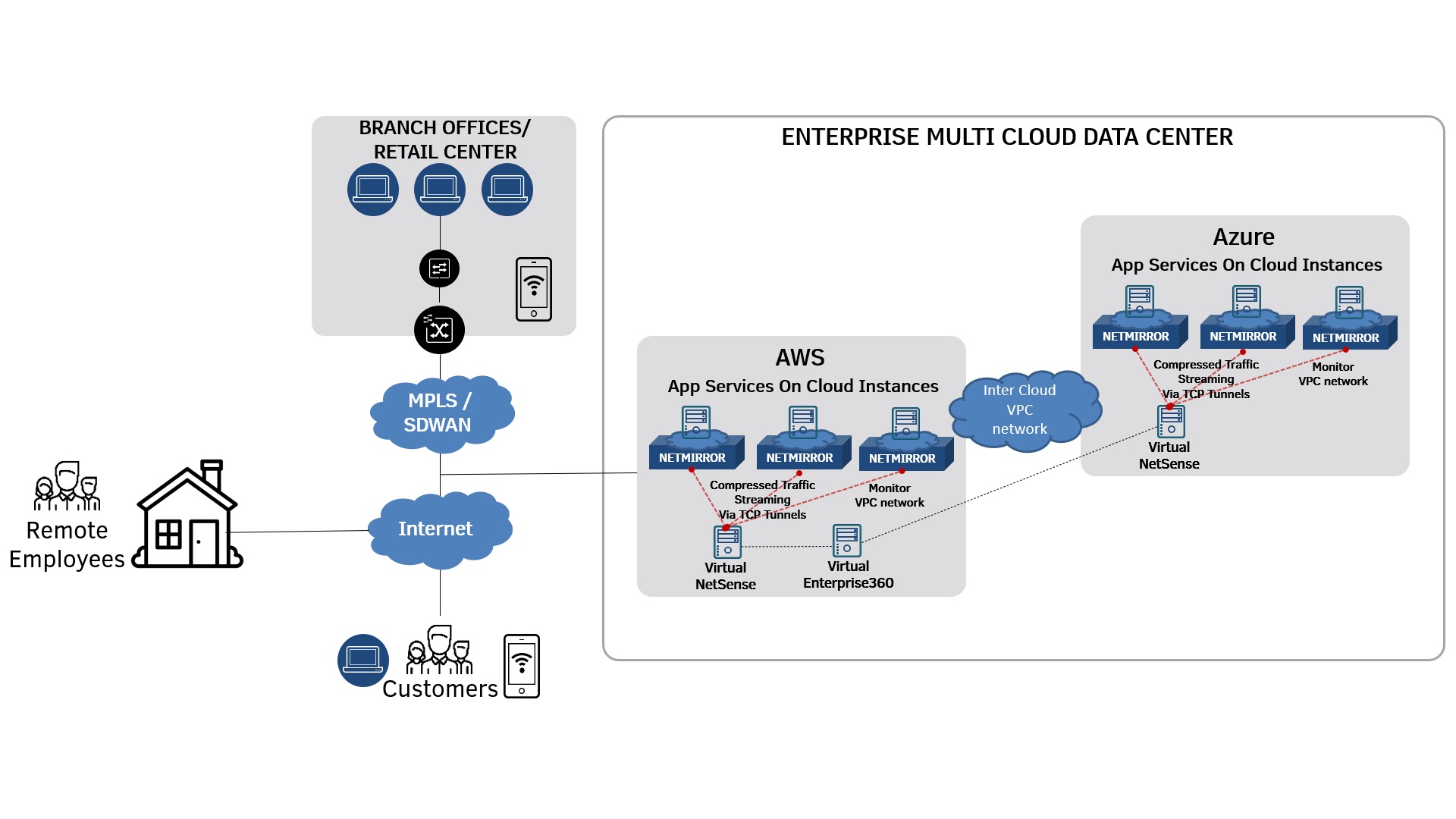
Website-HowitWorks

Step 1

Install vNetMirror on your computing nodes. Optionally embed vNetMirror on to your virtual images to start automatically as a service on any new instances

Step 2

Spin off Virtual vNetSense computing instances to receive the traffic from vNetMirrors. One vNetSense can receive tapped network traffic from several vNetMirrors

Step 3

Configure your vNetMirrors to stream traffic to respective vNetSense sensors and add vNetSense sensors to your virtual Enterprise360